Showing posts with label error. Show all posts

Thursday, August 26, 2021

XAMPP - MySQL shutdown unexpectedly


SQLSTATE[HY000] [2002] No connection could be made because the target machine actively refused it.
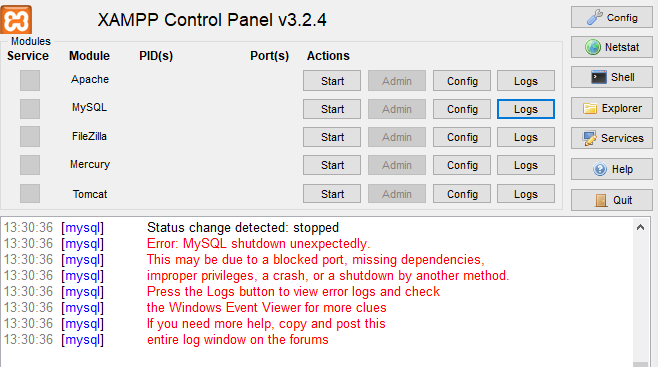
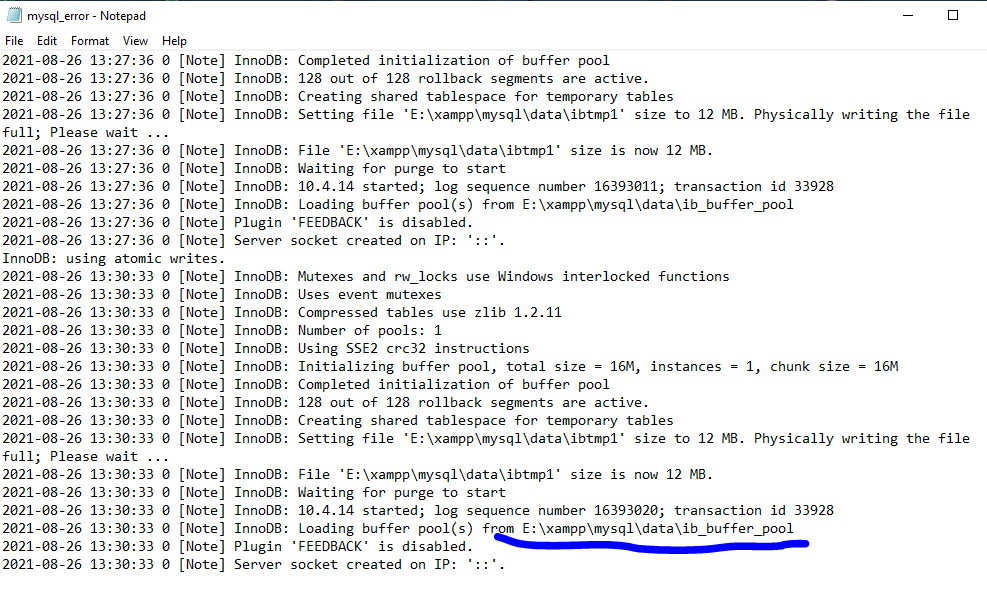


STOP ! Please do NOT delete the ibdata1 file!

Deleting this file is like playing Russian roulette with your databases. It could work and establish everything, but also, probably could leave every database you have.

Instead, first try using the MySQL backup folder which is included with XAMPP. So do the next:

  1. Rename the folder mysql/data to mysql/data_old (you can use any name)

  2. Create a new folder mysql/data

  3. Copy the content that resides in mysql/backup to the new mysql/data folder

  4. Copy all your database folders that are in mysql/data_old to mysql/data (skipping the mysql, performance_schema, and phpmyadmin folders from data_old)

  5. Finally copy the ibdata1 file from mysql/data_old and replace it inside mysql/data folder

  6. Start MySQL from XAMPP control panel

And, voilĂ !


Wednesday, November 22, 2017

What is csrf and xss clean?

          CSRF :

Cross-site request forgeries are a type of malicious exploit whereby unauthorized commands are performed on behalf of an authenticated user.

Laravel automatically generates a CSRF "token" for each active user session managed by the application. This token is used to verify that the authenticated user is the one actually making the requests to the application

XSS clean :

the attack is basically a type of code injection attack which is made possible by incorrectly validating user data, which usually gets inserted into the page through a web form or using an altered hyperlink. The code injected can be any malicious client-side code, such as JavaScript, VBScript, HTML, CSS, Flash, and others. The code is used to save harmful data on the server or perform a malicious action within the user’s browser.

Unfortunately, cross-site scripting attacks occurs mostly, because developers are failing to deliver secure code. Every PHP programmer has the responsibility to understand how attacks can be carried out against their PHP scripts to exploit possible security vulnerabilities. Reading this article, you’ll find out more about cross-site scripting attacks and how to prevent them in your code.

Preventing Cross-Site Scripting Attacks

  •     Data Validation

  •     Data Sanitization

  •     Output Escaping

  • Htmlspecialchars :

    • The htmlspecialchars() function converts some predefined characters to HTML entities.

  • HTML entities

    • The htmlentities() function converts characters to HTML entities.

  • Strip_tags

    • The strip_tags() function strips a string from HTML, XML, and PHP tags.

    • Note: HTML comments are always stripped. This cannot be changed with the allow parameter.

    • Note: This function is binary-safe.

      --------------------------------------------------------------------------------------------


Trim()

The trim() function removes whitespace and other predefined characters from both sides of a string.


ltrim() - Removes whitespace or other predefined characters from the left side of a string

rtrim() - Removes whitespace or other predefined characters from the right side of a string

Wednesday, February 25, 2015

Cross-Origin Request Blocked ?

ERROR : Cross-Origin Request Blocked: The Same Origin Policy disallows reading the remote resource at the url. This can be fixed by moving the resource to the same domain or enabling CORS.


Solution :

If you are working on web project  and want to get data from different site , Sometime you get such type of error 

" Cross-Origin Request Blocked: The Same Origin Policy disallows reading the remote resource at the url. This can be fixed by moving the resource to the same domain or enabling CORS. "

then you have to use .htaccess file 

update code

<FilesMatch "\.(php)$">
  <IfModule mod_headers.c>
    Header set Access-Control-Allow-Origin "*"
  </IfModule>
</FilesMatch>           


if you havn't    .htaccess file then create a file in root folder and update following code 
Following code for wordpress project please change according to your Project 


# BEGIN WordPress
<IfModule mod_rewrite.c>
  RewriteEngine On

 RewriteBase /
  RewriteRule ^index\.php$ - [L]
  RewriteCond
   %{REQUEST_FILENAME} !-f
  RewriteCond %{REQUEST_FILENAME} !-d

RewriteRule . /index.php [L]
</IfModule>
<FilesMatch "\.(php)$">
   <IfModule mod_headers.c>   
     Header set Access-Control-Allow-Origin "*"
   </IfModule>
</FilesMatch>
# END WordPress


Enjoy Coding  :) 


comment please :)

How to Host a Laravel Project on Hostinger’s hPanel: A Step-by-Step Guide

How to Host a Laravel Project on Hostinger’s hPanel: A Step-by-Step Guide If you're looking to host a Laravel project on Hostinger’s hPa...